Medical Invoice Software: What to Look For and How to Choose
See if you qualify for Medical Billing and Coding programs
Answer a few questions in 2 minutes. Free, no commitment.
Medical invoice software generates and manages the bills a practice sends to patients and, in fuller systems, the claims it sends to insurance payers. The first decision is whether you need a standalone invoicing tool for patient statements and card payments or a full billing system that also files claims and posts payer remittances. That choice turns on four things: the claim format the product can produce, whether the vendor signs a HIPAA business associate agreement, how it connects to your EHR, and which pricing model fits your volume. The rest is matching the tool to how your practice gets paid.
Key Points
- Medical invoice software has two jobs, patient statements and correctly formatted insurance claims, and the second one separates a billing tool from generic invoicing.
- HIPAA compliance is non-negotiable because every bill and claim contains protected health information, so the vendor must sign a business associate agreement and meet the Security Rule's safeguards.
- Standalone invoicing tools and full billing systems solve different problems at different prices, from free plans with transaction fees to per-provider subscriptions and percentage-of-collections contracts.
- Integration with your EHR or practice management system matters more than any single feature, since 91% of office-based physicians already run a certified EHR.
What Is Medical Invoice Software?
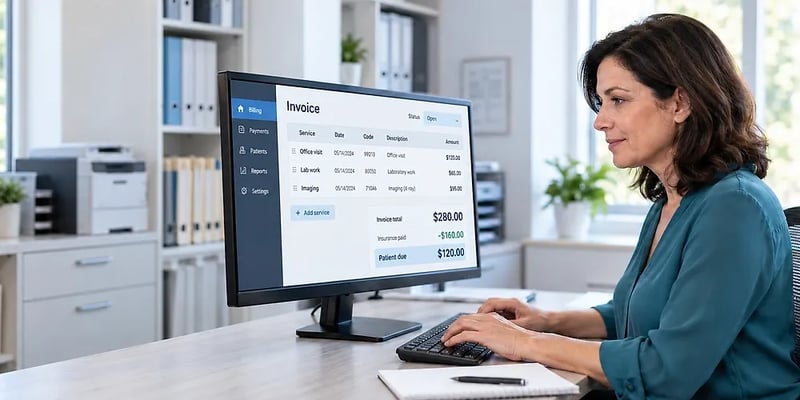
Medical invoice software, which some vendors call medical invoicing software, builds and tracks the bills a healthcare practice sends out. At its narrowest, it generates patient statements after insurance has paid, accepts card or bank payments, and reports what is still outstanding. At its widest, it is the billing half of a practice management system: it turns each visit into a coded claim, sends the claim to the payer, posts the payment, and bills the patient for the remainder.
A medical bill is not an ordinary invoice. It carries diagnosis and procedure codes, a rendering provider, a place of service, and coverage details, all of which are protected health information under HIPAA. A general invoicing product can total a line item and email a PDF, but it cannot produce the claim formats payers require, and without a business associate agreement your practice cannot put patient data in it. The guide to what medical billing and coding is shows how a visit note becomes a claim.
Key Features to Look For
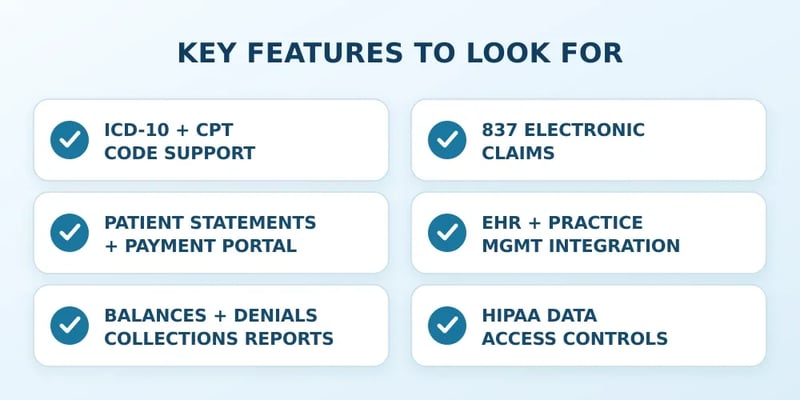
Six capabilities separate a tool that will carry a practice from one that will need replacing.
- ICD-10 and CPT code support: current diagnosis and procedure code sets attached to each charge, with a warning when a claim is missing a code.
- Electronic claims in the 837 format: CMS adopted the ASC X12N 837, version 5010, as the HIPAA standard for claims, and Medicare requires electronic filing from all but waiver-eligible providers. A product that cannot generate an 837, directly or through a clearinghouse, is invoicing software, not billing software.
- Patient statements and a payment portal: statements by mail, text, or email, and a portal that takes card, bank, or digital wallet payments, which brings PCI DSS, the card industry's security standard, into scope.
- EHR and practice management integration: charges flow from the visit record into the claim without retyping, and payments post back automatically.
- Reporting on balances, denials, and collections: aging by payer and patient, denial reasons by code, and days in accounts receivable, the reports an outside medical billing audit asks for.
- HIPAA data handling and access controls: encryption in transit and at rest, per-user logins with role-based permissions, automatic logoff, and an audit log of who viewed or changed a record.
If you bill uninsured or self-pay patients, add one more: the No Surprises Act requires a written good faith estimate within one to three business days of scheduling, and a patient may dispute a bill that runs at least $400 above it, according to CMS. Software that generates and stores those estimates saves a manual step on every cash-pay visit.
Medical Invoice Software vs. Full Medical Billing Software
The two categories overlap on patient statements and payments and split on everything that touches a payer. An invoicing tool creates the bill, takes the payment, and sends reminders. A full billing system also handles the payer side, which the HIPAA transaction standards CMS administers define: the 837 claim, the 835 remittance advice, the 270/271 eligibility check, and the 276/277 claim status inquiry. Each is a task a practice automates or pays staff to do by hand.
That difference carries a price. The 2025 CAQH Index, now published by DataSpring after CAQH's June 2026 rename, puts the average cost to a medical provider at $8.03 for a manual transaction against $3.39 for an electronic one. It also estimates that $18.7 billion a year is still on the table if the remaining manual work went electronic.
Which claim you file depends on what you bill: a physician's services go out on the professional 837P and facility charges on the institutional 837I, a split explained in types of medical billing.
Capability | Invoice software | Full billing software |
|---|---|---|
Patient statements and payments | Yes | Yes |
Insurance claims (837) | No, or through a separate clearinghouse | Built in or through an integrated clearinghouse |
Eligibility checks (270/271) and remittance posting (835) | No | Yes |
Denial tracking and appeals | No | Yes |
Typical pricing | Free or low fee plus card processing | Per-provider subscription or percentage of collections |
Popular Medical Invoice and Billing Software Options
A solo cash-pay practice and a multi-provider group are not shopping for the same thing, so the names below are grouped by category rather than ranked.
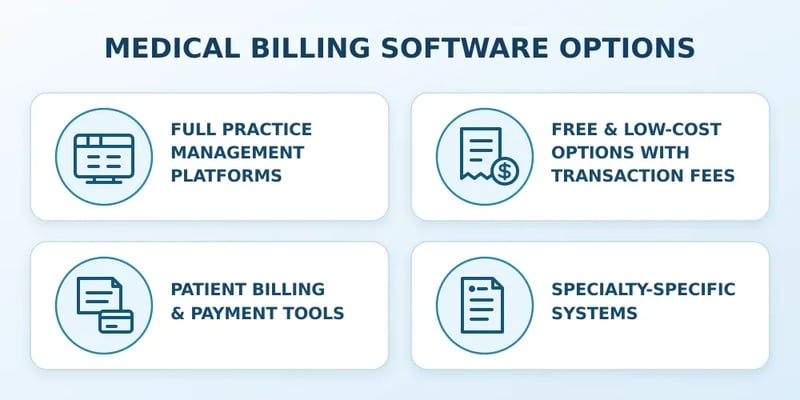
Full Practice Management Platforms
Tebra (formerly Kareo, which merged with PatientPop and moved to Tebra.com in December 2024), AdvancedMD (which absorbed NueMD in 2018), athenahealth, CareCloud, CureMD, DrChrono (part of EverCommerce since 2021), and PracticeSuite all combine scheduling, EHR integration, claims, remittance posting, and patient billing in one system. This is the category for practices that file with more than a handful of payers.
Free and Low-Cost Options With Transaction Fees
Office Ally's Practice Mate carries no monthly subscription fee, with transaction fees on some services, and PracticeSuite offers a free single-user account limited to 25 electronic commercial claims a month.
Patient Billing and Payment Tools
Inbox Health handles patient statements, reminders, and collections on top of an existing practice management system, while Square offers invoices, appointments, and card processing, with a business associate agreement that covers its Invoices and Appointments features. Both pair with a claims system rather than replacing one.
Specialty-Specific Systems
SimplePractice and TherapyNotes are built for behavioral health and bundle notes, scheduling, telehealth, and claims at per-clinician prices. Clearinghouse platforms such as Waystar transmit claims and return payer responses for billing software and billing services, so a practice may rely on one without ever logging into it.
HIPAA Compliance and Medical Invoice Software
A billing vendor that stores or transmits patient data is a business associate under HIPAA, a relationship HHS says covers billing and claims processing. The rules require a written business associate agreement before protected health information changes hands, and the business associate is directly liable under HIPAA for misusing it. Without a signed agreement, the product is off the table whatever its marketing says.
The technical side is the Security Rule, which requires covered entities and their vendors to protect the confidentiality, integrity, and availability of electronic protected health information through administrative, physical, and technical safeguards. For a buyer, that means:
- Encryption in transit and at rest.
- Unique user accounts, role-based permissions, and automatic logoff.
- An audit trail of access to each patient record.
- A documented breach notification process.
HHS also proposed an update in January 2025 that would make encryption mandatory rather than addressable and add a multifactor authentication requirement. As of September 2026 it has not been finalized, so a vendor that already meets both is ahead of the standard.
How Much Does Medical Invoice Software Cost?
Pricing follows three models, and the model matters more than the sticker price.
- Per-provider monthly subscription: the usual model for full billing systems. Published examples as of September 2026 include TherapyNotes at $69 a month for a solo practice, SimplePractice at $49 to $99 a month by tier, and Office Ally's EHR 24/7, which pairs with its free Practice Mate, at $44.95 per provider per month.
- Percentage of collections: the vendor keeps a share of what it collects, usually bundled with billing services. Vendors quote the rate individually rather than publishing it, so get the percentage in writing along with what counts as a collection.
- Free or flat-fee software with transaction charges: Practice Mate bills per transaction on some services, and card processing is priced by the payment vendor. Square, for example, publishes an in-person rate of 2.6% plus 15 cents.
Medical billing software cost, then, depends on provider count, claim volume, and how much work the vendor does. Add-ons such as electronic claims (TherapyNotes charges 14 cents each), text reminders, and statement mailing are where a low headline price grows.
How to Choose the Right Medical Invoice Software for Your Practice
Start with how you get paid, because that decides the category before any feature comparison.
- Mostly self-pay: a patient billing and payment tool with a business associate agreement covers the job, and good faith estimate support is the feature to confirm.
- Claims with multiple payers: you need the 837, 835, 270/271, and 276/277 transactions built in or through an integrated clearinghouse, which points to a full billing system.
- Medical billing software for small practices lives mostly in the free and per-provider tiers, so check claim caps and transaction fees against a real month of volume.
- Confirm the integration with your EHR by name and ask to see a charge flow into a claim. ONC's 2024 survey found 91% of office-based physicians on a certified EHR but only 79.9% of solo practitioners, so a solo practice should also ask how the tool works without one.
- Ask for the business associate agreement and security summary before the demo.
Before signing, read the contract for the exit: who owns your data, what format it exports in, and what leaving costs.
Frequently Asked Questions
Is regular invoicing software like FreshBooks or QuickBooks HIPAA compliant enough?
No. Intuit's own help documentation says QuickBooks Online is not compliant with HIPAA privacy standards and advises healthcare professionals not to enter individually identifiable health information into it, according to Intuit. Unless an invoicing vendor signs a business associate agreement, patient names, dates of service, and diagnoses cannot go into it.
What is the best free medical billing software?
Office Ally and PracticeSuite both publish free tiers as of September 2026. Practice Mate has no monthly subscription fee and charges per transaction for some services, and PracticeSuite's free single-user account is capped at 25 electronic commercial claims a month. Both charge once you outgrow those limits, so match the plan to your claim volume.
Does invoice software submit insurance claims directly?
Standalone invoice software does not. Claims reach payers in the HIPAA-standard 837 format, directly or through a clearinghouse, and only billing software or a practice management system generates that file. Some invoicing tools connect to a separate clearinghouse for a per-claim fee, which leaves eligibility checks and remittance posting manual.
How much does medical billing software cost per provider?
Published per-provider subscriptions run from $49 to $99 a month for solo behavioral health platforms such as SimplePractice and TherapyNotes as of September 2026, with electronic claims often billed separately, for example 14 cents each at TherapyNotes. Full practice management platforms price by provider or by a percentage of collections and quote those rates individually.
Does the software need to integrate with an EHR?
For any practice that files claims, yes. ONC's 2024 data shows 95% of office-based physicians use an EHR and 91% use a certified one, so the billing tool almost always has to read charges from a record system that already exists. Without integration, staff retype every visit, which is where coding errors and missed charges creep in.
Picking Invoice Software That Fits Your Practice
The 837 test settles most of the confusion in this market. A product that can produce a HIPAA-standard claim is billing software and belongs on the list for any practice that works with payers. One that cannot is invoice software, the right tool for a self-pay practice and the wrong one for everybody else.
Whichever side you land on, the business associate agreement comes before the demo, the integration gets proven on your own EHR, and the price gets calculated on a real month of claims and statements. A tool that passes those three checks will still be doing its job in three years.